
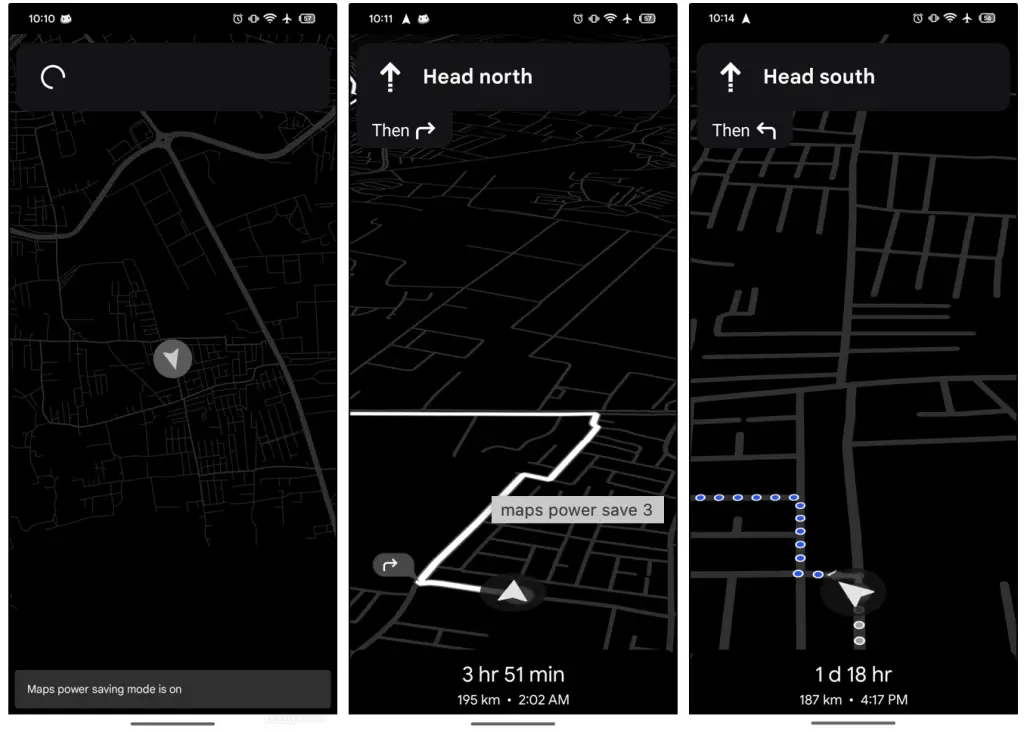
Google Maps is getting a feature many users have requested for years: a way to navigate without watching your phone battery melt away. The new Google Maps Power Saving Mode, available first on the Pixel 10 series, allows turn-by-turn navigation to run in a low-power, simplified interface that trades visual flair for hours of additional usage.
This update marks one of the most practical upgrades Google has made to Maps in years, especially for commuters, long-distance drivers, and anyone who relies heavily on navigation apps. With the feature rolling out now, Pixel 10 owners will be the first to experience a redesigned navigation experience that prioritizes endurance over aesthetics.
What is Google Maps’ power-saving mode?
Google Maps Power Saving Mode is a new navigation setting designed to reduce battery consumption during driving. Unlike standard battery saver options that affect the entire device, this feature optimizes Google Maps specifically for long trips.
Instead of showing the full navigation interface, Google Maps enters what Google calls AOD Min Mode. This mode displays navigation on the Always-On Display, making the app usable while keeping the screen dimmed and simplified.
The feature is currently exclusive to Pixel 10 and Pixel 10 Pro devices and only activates while driving.
How does the new power-saving mode work?
Power Saving Mode reduces battery drain by simplifying the navigation interface and limiting energy-intensive features.
It uses the Always-On Display for navigation
Google uses the Pixel 10’s efficient AOD system to run a monochrome, low-brightness, full-screen navigation view. Instead of vivid color-coded lanes or real-time zoom animations, the interface reduces everything to essential information.
It limits visual and sensor-heavy elements
In Power Saving Mode, Google Maps turns off:
- Traffic overlays
- Color-coded roads
- Automatic zooming
- Street-name labels
- 3D buildings
- Continuous map animations
What remains is the bare minimum needed to navigate safely:
- Your next turn
- Estimated arrival time
- Distance to your next maneuver
This minimalism keeps the battery from draining quickly while maintaining clarity on the road.
Why battery savings are so significant
Full navigation views demand constant screen refreshes, GPS polling, map rendering, internet checks, color display power, and animation cycles. AOD Min Mode minimizes all of them.
Google claims users may gain up to four additional hours of navigation during long trips. For drivers who rely heavily on their phones as their primary GPS system, those four hours can make the difference between a seamless journey and a dead phone halfway to the destination.
How do you activate Google Maps’ power-saving mode?
The feature is designed to trigger easily without distracting the driver.
One tap during navigation
To activate Power Saving Mode:
- Start turn-by-turn navigation as usual
- Tap the Pixel 10’s power button once
This instantly switches Google Maps into low-power AOD Min Mode.
There is no need to dig through settings while driving, which keeps the process safe and intuitive.
Enabled by default
For Pixel 10 users, Google Maps Power Saving Mode is enabled out of the box. This means the app may automatically switch into AOD Min Mode when you begin navigating.
If you prefer the traditional full-color interface, you can disable the feature:
- Open Google Maps
- Go to Settings
- Navigate to Navigation Settings
- Toggle off Power Saving Mode
This customization ensures drivers can choose between battery longevity and a more detailed visual map.
Why is the feature limited to the Pixel 10 right now?
While Google has not explained the restriction in detail, there are several likely technical reasons for Pixel exclusivity:
Hardware-level AOD optimization
The Pixel 10 series includes updated display drivers and more efficient Always-On Display hardware. AOD Min Mode depends on these optimizations to run navigation continuously without overheating or draining the battery too quickly.
Tensor G4 power management
Google’s Tensor G4 chipset includes optimizations for background processes and sustained low-power modes. Running Maps continuously on AOD requires precise thermal and battery balancing, which Tensor devices are tuned for.
Early rollout strategy
Google often launches exclusive features on Pixels first, then expands them to other Android phones after months of testing. This may follow the same pattern as previous Pixel-first features such as Call Screening, Hold for Me, and offline Live Translate.
Why Google Maps power-saving mode matters for drivers
It solves a real problem
Navigation apps are among the most power-hungry smartphone tools. Long drives often require users to constantly charge or carry backup batteries. Power Saving Mode directly addresses this pain point.
It improves safety
A simplified, low-distraction interface can reduce the chances of driver over-reliance on animated map elements. Minimalism forces the user to focus on essential turn cues instead of the map’s visual noise.
It reduces heat and extends device life
Sustained full-screen navigation can cause phones to heat up, leading to performance throttling. Running Maps on AOD keeps temperatures lower, which can help maintain long-term battery health.
It opens new possibilities for always-on navigation
This update suggests Google may be moving toward a future where:
- Navigation runs seamlessly in the background
- AOD displays become more intelligent and interactive
- Battery optimization becomes a core Maps feature for all Android users
How the new mode fits into Google’s broader Maps strategy
Google has been gradually redesigning Maps to remove clutter, improve readability, and add more contextual information. The introduction of Power Saving Mode supports a larger shift toward adaptive interfaces—interfaces that adjust based on context, environment, and user behavior.
For example:
- Maps automatically adjust brightness at night
- Bicycle mode simplifies the map for safer riding
- Live updates now prioritize essential alerts
This new AOD-based navigation experience suggests that Google wants Maps to be more flexible, power-efficient, and context-aware.
TL;DR
Google Maps Power Saving Mode is a new feature for Pixel 10 phones that shifts navigation to a dim, monochrome Always-On Display, removing energy-intensive elements. It can add up to four hours of battery life during long drives, activates with a single tap, and is enabled by default. Though Pixel-exclusive for now, it hints at a future where all Android users get more efficient navigation options.