
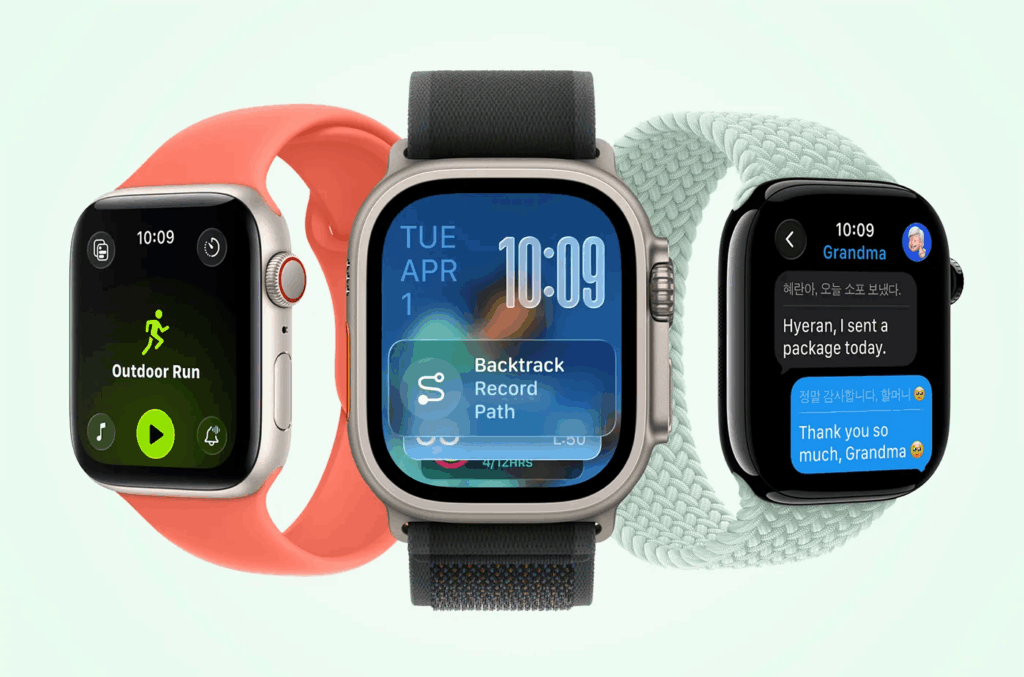
Apple has officially rolled out watchOS 26, a major update that introduces fresh design elements, smarter health tracking, and new ways to personalize your Apple Watch. Compatible with models from Series 6 through Series 11, along with the 2nd and 3rd-generation SE and all Ultra models, this release focuses on usability, health insights, and AI-powered motivation.
Whether you’re upgrading for the sleek new interface or the practical health alerts, here’s everything you need to know — plus a step-by-step guide on how to install watchOS 26.
What’s new in watchOS 26?
Apple has bundled both visual refinements and meaningful upgrades that impact daily use. Let’s break them down:
A new design language: Liquid Glass
- What it is: Apple’s Liquid Glass design brings a glossy, semi-transparent look to app windows, notifications, and icons.
- Why it matters: While subtle compared to iPhone or Mac, the shimmering effect makes Smart Stack, Control Center, and apps feel more modern and cohesive.
- Takeaway: Expect a sleeker watch UI without a learning curve.
Wrist flick gesture for faster actions
- How it works: Rotate your wrist outward to silence calls, dismiss notifications, or stop timers.
- Why it matters: It’s quicker than the older double-pinch gesture and more natural in real-world scenarios like meetings or workouts.
- Example use case: Imagine silencing an alarm while carrying groceries; no taps required.
Smarter audio and Notes on your wrist
- Automatic volume adjustment: Calls, Siri responses, and notifications adapt dynamically to your environment. Louder in noisy streets, softer at night.
- Notes app integration: For the first time, you can create notes directly on your Apple Watch. Siri can also draft notes hands-free, turning your watch into a pocket notebook alternative.
Advanced health tracking features
- Hypertension notifications: Using optical sensors, your watch analyzes vascular responses over 30 days to detect early signs of high blood pressure.
- Note: This is not a substitute for medical diagnosis; users should consult a doctor if they receive repeated alerts.
- Sleep score: A simple numerical rating based on sleep duration, interruptions, and bedtime consistency.
- Why it matters: Instead of vague graphs, you now get a clear score that’s easy to track and improve.
Personalization with AI-powered Workout Buddy
- What it does: Uses your past fitness data to provide motivational prompts during workouts.
- Why it matters: Personalized encouragement can boost adherence to exercise routines, especially for casual users.
- Widget customization: Rearrange Smart Stack widgets to highlight what’s most relevant: weather, workouts, reminders, or stock prices.
How to update your Apple Watch to watchOS 26
Updating is straightforward, but a few requirements must be met first.
Before you start:
- Ensure your paired iPhone is running iOS 26.
- Keep your iPhone connected to Wi-Fi and near your watch.
- Charge your Apple Watch to at least 50%.
Step-by-step update process:
- Open the Watch app on your iPhone.
- Navigate to My Watch > General > Software Update.
- If watchOS 26 is available, tap Download and Install.
- Follow the on-screen prompts.
- Keep both devices close until the update completes.
Why should you update to watchOS 26?
- Better usability: Wrist flick gesture and smarter UI reduce friction in daily interactions.
- Deeper health insights: Hypertension alerts and sleep scores provide actionable health data.
- Enhanced personalization: Workout Buddy and customizable widgets give you a more tailored experience.
- Future-proofing: Installing watchOS 26 ensures ongoing security patches and app compatibility.
TL;DR
- watchOS 26 is now available for Apple Watch Series 6+, SE (2nd & 3rd gen), and Ultra models.
- Highlights include Liquid Glass design, wrist flick gesture, Notes app, hypertension notifications, and Workout Buddy AI.
- Update by pairing with an iPhone running iOS 26 → Watch app → General → Software Update.