

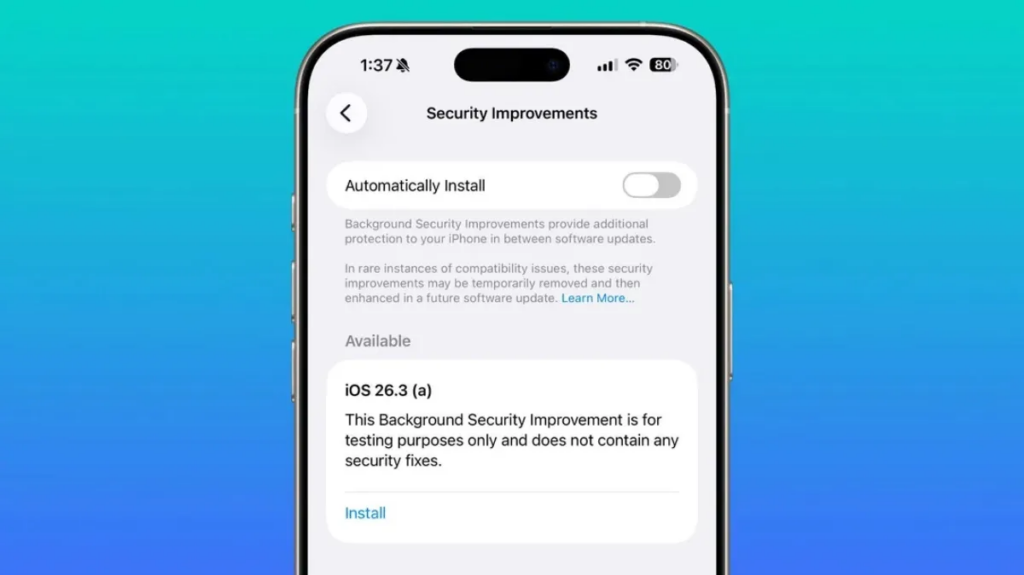
Apple Inc. has quietly introduced a new way to deliver urgent security fixes, and it could change how users experience software updates altogether. The company’s first-ever “background security improvement” update targets a vulnerability in its Safari browser, marking a shift toward faster, less disruptive patching.
This new mechanism is designed to fix critical issues without requiring full system updates, long installs, or user intervention beyond a quick restart.
What is Apple’s background security improvement update?
Apple’s background security improvement update is a lightweight patch system that delivers critical fixes between major software releases.
Unlike traditional updates, these are
- Smaller in size
- Faster to install
- Focused on specific vulnerabilities
- Delivered quietly in the background
They are currently available on devices running newer versions of iOS, iPadOS, and macOS (26.1 and above).
What makes this different from regular updates?
Traditional updates often bundle:
- New features
- UI changes
- Performance improvements
- Security patches
By contrast, background updates focus only on security, allowing Apple to respond faster when vulnerabilities are discovered.
What vulnerability did Apple fix?
The recent update addresses a flaw in WebKit, the core engine that powers Safari and many other apps.
Why WebKit matters
WebKit is responsible for rendering web pages. If compromised, it can expose sensitive data across browsing sessions.
In this case, the vulnerability could allow:
- Malicious websites to access data from other tabs
- Cross-site data leakage within the same browser session
That’s a serious issue, especially for users who:
- Stay logged into multiple accounts
- Handle financial or personal data in-browser
How does the Safari security flaw work?
The flaw lies in how WebKit isolates website data.
In simple terms:
- Browsers are supposed to keep each site’s data separate
- This bug weakens that separation
- A malicious site could potentially “peek” into another site’s data
This kind of vulnerability is particularly dangerous because it:
- Doesn’t require users to download anything
- Can be triggered just by visiting a compromised site
How do background security updates work?
Apple’s new system is built for speed and minimal disruption.
Key features:
- Automatic delivery: Updates are pushed silently to eligible devices
- Targeted fixes: Only affected components (like Safari or WebKit) are patched
- Minimal restart required: Users only need a quick reboot
This is a major improvement over traditional updates that can take several minutes and interrupt workflows.
What users need to do
In most cases:
- The update downloads automatically
- A restart prompt appears
- The fix is applied within seconds
Why did Apple introduce this system now?
Security threats are evolving faster than traditional update cycles.
Key reasons behind the shift:
1. Faster response to zero-day vulnerabilities
Critical flaws can be exploited within hours of discovery. Background updates allow Apple to act quickly.
2. Better user compliance
Many users delay full updates. Smaller, less intrusive patches increase the likelihood that devices stay secure.
3. Reduced fragmentation
By pushing targeted fixes, Apple ensures more devices are protected at the same time.
How does this compare to competitors?
Apple isn’t the first to move in this direction.
Similar approaches:
- Google has long used modular updates for Android components
- Microsoft delivers rapid security patches through Windows Update
However, Apple’s approach stands out because:
- It tightly integrates with its hardware-software ecosystem
- It minimises user involvement even further
What does this mean for users?
For most people, this change is subtle—but important.
Benefits:
- Faster protection against threats
- Fewer disruptive updates
- Improved overall device security
Potential concerns:
- Less visibility into what’s being updated
- Reliance on automatic systems
That said, Apple typically publishes detailed advisories for transparency.
What should you do right now?
Even though these updates are automatic, users still play a role.
Recommended steps:
- Restart your device when prompted
- Keep your OS updated to the latest version
- Avoid ignoring security notifications
You can also check Apple’s official advisories for details on recent patches.
Why this matters beyond Safari
This isn’t just about fixing one browser bug—it’s about how software will be updated going forward.
Bigger implications:
- Security updates may become continuous rather than periodic
- Operating systems could become more modular
- Users may experience fewer “big update” moments
In short, Apple is moving toward a model where security is always up to date, quietly and automatically.
TL;DR
- Apple Inc. introduced its first background security improvement update
- It fixes a serious vulnerability in WebKit
- The flaw could allow malicious websites to access data from other sites
- Updates are lightweight, automatic, and only require a quick restart
- This marks a shift toward faster, less disruptive security patching