


• About BreezyScroll
  • Privacy & Policy
  • Contact Us
Thursday, June 4, 2026
BreezyScroll
  • Home
  • Breezy Stories
  • Technology
  • Gaming
  • Entertainment
  • Lifestyle
  • World
  • Money
  • Sports
  • Breezy Explainer
No Result
View All Result
  • Home
  • Breezy Stories
  • Technology
  • Gaming
  • Entertainment
  • Lifestyle
  • World
  • Money
  • Sports
  • Breezy Explainer
No Result
View All Result
BreezyScroll
No Result
View All Result

Home  /  Technology  /  How to post Instagram Stories without opening the app

How to post Instagram Stories without opening the app

by KS Arpitha
April 26, 2021
in Technology
Reading Time: 3 mins read
Instagram Stories

Uploading Instagram stories without opening the app?” It might sound like a hoax but, it is not. If you want to reduce time spent on social media and still be updated, this is just the hack for you. It lets you upload, view, and share stories without opening Instagram.

For this, users will need to download the Threads from the Instagram app from Google Play Store or App Store. This app lets you quickly post photos or videos on Instagram Stories without having to go into the main app. Here is how you can upload Insta stories without opening the app in 5 simple steps.

Step 1

Thread app by Instagram

Download the app ‘Threads from Instagram’ from the app store or play store.

Step 2

Launch the app and log in with your Instagram account details. If the app is downloaded on a device where the main Instagram app is not installed, then you will have to manually add login details. Remember to provide contact, camera, and gallery permissions. Choose the option ‘only while using the app’

Step 3

Close friend list on Instagram

Now, Threads will ask you to choose close friends with whom you want to share your Instagram story. If you have already made a Close Friends list on Instagram, the same list will be checked. You can add more users and then tap Done.

Step 4
Thread app

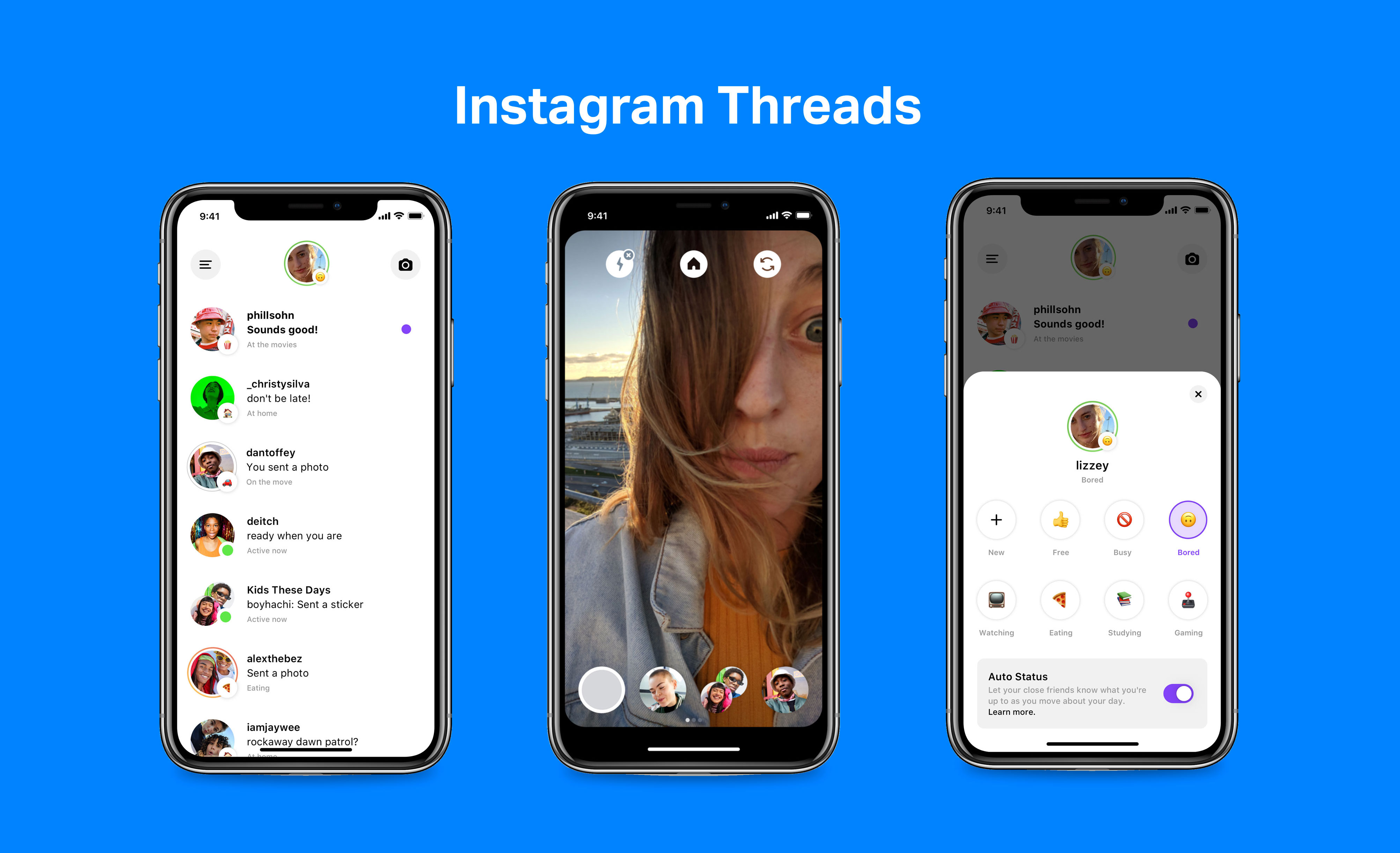
The app has three sections that let you see stories, upload stories, and access your DMs. To upload your story, tap the camera icon in the second section and share images or videos of your choice. Just like the Instagram camera, this app lets you add text, stickers, and fun filters. Click the upload button to post your story directly.However, users cannot add music, polls, questions to their Stories through the Threads app.

Step 5

After editing and applying filters, click on the upward arrow (upload) button showing up at the bottom of the page. Click on Your Story > Share. You can also click on the Close Friends list and then share if you want only a select few to see your Story. This will automatically post your Story on your Instagram without opening the app.

The app ‘Threads From Instagram” is one of the most convenient methods to stay updated. It’s useful if you do not want to waste time scrolling through the feed. The app allows Insta users to upload their stories and share them with friends without even opening the app. It also lets you access your DMs.


Tags: Instagram HacksInstagram storiesThread App
ShareTweetShareSend

Recent Articles

WWDC 2026: What to Expect From Apple’s Biggest Software Event of the Year

WWDC 2026: What to Expect From Apple’s Biggest Software Event of the Year

June 4, 2026
US Wildlife Officials Urge Residents to Kill Invasive Tegu Lizards Spreading Across Southern States

US Wildlife Officials Urge Residents to Kill Invasive Tegu Lizards Spreading Across Southern States

June 4, 2026
Monako Glass: Chinese Smart Glasses Can Run Claude Code and Codex

Monako Glass: Chinese Smart Glasses Can Run Claude Code and Codex

June 4, 2026
Prince Harry Reportedly Not Invited to Peter Phillips’s Wedding Amid Royal Rift

Prince Harry Reportedly Not Invited to Peter Phillips’s Wedding Amid Royal Rift

June 4, 2026
BreezyScroll Logo

BreezyScroll is a global content platform that provides a unique experience of enhancing the knowledge quotient for its audience by providing the latest news and updates from various categories such as politics, sports, entertainment, technology, and more.
The platform aims to provide a concise and easy-to-read format for its users. BreezyScroll covers news stories from around the world, majorly the United States. The platform was launched in 2021 and has become one of the fastest-growing content companies in the US.

Follow Us

Browse by Category

  • Africa
  • Alaska
  • Animals
  • Asia
  • Athletics
  • Australia
  • Auto
  • Basketball
  • Bollywood
  • Brand
  • Breezy Explainer
  • Breezy Feature
  • Breezy Soul
  • Business
  • Canada
  • Chess
  • China
  • Coronavirus
  • Cricket
  • DIY
  • Education
  • Entertainment
  • Environment
  • EPL
  • Europe
  • Exclusive Interview
  • Exclusive Review
  • Football
  • Gaming
  • Health
  • Hollywood
  • India
  • International
  • K Pop
  • Law
  • Lifestyle
  • Middle East
  • Money
  • NFL
  • North America
  • OTT
  • Paris Olympics
  • Pets
  • Press Releases
  • Russia
  • Science
  • South America
  • Space
  • Sports
  • Startup
  • Technology
  • Tennis
  • Tennis
  • The Achievers
  • The US
  • Travel
  • UK
  • UK
  • Uncategorized
  • World
  • WWE

Trending Topics

AI Apple Australia Biden California Canada ChatGPT China Climate Change Coronavirus COVID-19 Donald Trump Elon Musk Featured Florida Google IPL Iran Japan Joe Biden Mars Meta Moon NASA NBA Netflix New York North Korea Ohio OpenAI Putin Russia Russia-Ukraine crisis South Korea Taliban Tesla Texas TikTok Trump Twitter UFO UK Ukraine USA Virat Kohli

No Result
View All Result
  • About BreezyScroll
  • Privacy & Policy
  • Contact Us

© 2024 · BreezyScroll.com

No Result
View All Result
  • Home
  • Breezy Stories
  • Technology
  • Gaming
  • Entertainment
  • Lifestyle
  • World
  • Money
  • Sports
  • Breezy Explainer

© 2024 · BreezyScroll.com

Go to mobile version