


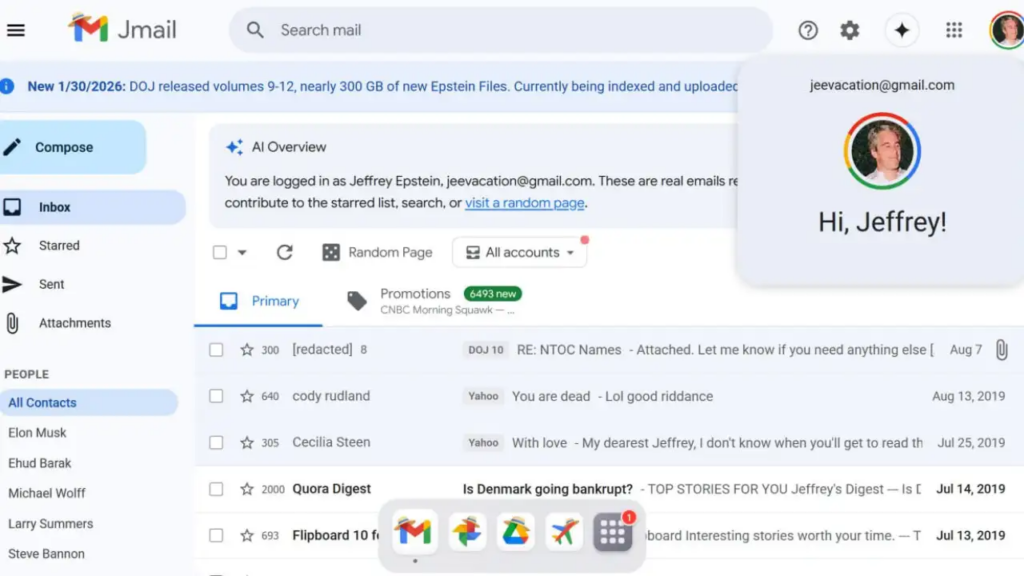
The release of Jeffrey Epstein–related records has often followed a familiar pattern: huge document dumps, scattered PDFs, blurry scans, and hours of manual searching just to find a single name or email thread. Now, a new online tool called Jmail is changing that experience dramatically.
Instead of forcing users to dig through disjointed files, Jmail reorganizes publicly released Epstein emails into a Gmail-style interface, making the archive searchable, readable, and far easier to analyze. For journalists, researchers, and curious members of the public, it turns a daunting disclosure into something navigable.
Importantly, Jmail doesn’t introduce new material. It reshapes what’s already public, and that design choice is the point.
What Is Jmail and How Does It Work?
Jmail is a web-based tool that presents already released Epstein emails in an inbox-style layout that closely mirrors Google’s Gmail.
Behind the scenes, the creators used:
- Optical Character Recognition (OCR) to extract text from scanned documents
- AI-based text conversion to clean up poorly formatted files
- Manual structuring to preserve original email threads and timelines
The result is an interface where users can scroll through messages, open conversations, and search for names or keywords—without touching a PDF.
Think of it less as a leak and more as a user interface upgrade for public records.
Who Built Jmail and Why?
Jmail was developed by:
- Riley Walz, an internet artist
- Luke Igel, a software engineer and CEO of AI video editing firm Kino
According to the developers, the motivation was simple: friction.
Epstein-related emails had been technically public for years through court cases and Justice Department disclosures, but they were effectively inaccessible to most people. Journalists had to open files one by one. Readers gave up quickly. Patterns were hard to spot.
Jmail removes that barrier without altering the underlying data.
What Makes Jmail Different From Previous Epstein Archives?
Plenty of Epstein document repositories already exist. What sets Jmail apart is presentation, not content.
A Familiar Inbox Experience
The interface looks and feels like Gmail:
- Subject lines appear in a list view
- Clicking opens individual emails or full threads
- Conversations are grouped, not scattered
- Previews help users decide what’s worth opening
That familiarity lowers the learning curve. You don’t need legal or technical expertise to start exploring.
Powerful Search Across Emails
Instead of Ctrl+F on dozens of PDFs, users can:
- Search names, dates, or keywords across the entire archive
- Jump directly to relevant messages
- Follow correspondence chronologically
This makes it far easier to track relationships and timelines—key for investigative work.
How Does Jmail Fit Into the Broader Epstein Files Portal?
Jmail is just one part of a larger ecosystem designed to organize Epstein-related records. The broader portal includes themed sections such as:
- Jphotos – Images released by the Department of Justice
- JDrive – Documents and files from court and DOJ disclosures
- JFlights – Flight logs of Epstein’s private jet
- Jamazon – Records of Epstein’s online purchases
All of this material comes from publicly released documents that were previously difficult to navigate in raw form.
How to Use Jmail: A Step-by-Step Guide
For first-time users, Jmail is intentionally intuitive.
- Open the Jmail portal, which loads the Epstein email archive in inbox view
- Use the search bar to look up names, keywords, or phrases
- Click subject lines to open individual emails or full threads
- Scroll chronologically to follow conversations over time
- Use inbox-style cues like previews and highlights to flag notable emails
If you’ve ever used Gmail, you already know how to use Jmail.
Why Jmail Matters for Journalism and Public Transparency
Large-scale disclosures often fail not because information is hidden, but because it’s unusable.
Jmail shows how design can shape transparency:
- Journalists can spot patterns faster
- Researchers can trace connections more clearly
- The public can engage with primary sources directly
Crucially, Jmail does not claim that names appearing in emails imply wrongdoing. That responsibility still lies with reporting, verification, and context. What it does is level the playing field between institutions with research teams and individuals with a laptop.
What Jmail Does Not Do
It’s worth being clear about the limits.
- Jmail does not add private or leaked material
- It does not authenticate or interpret emails
- It does not allege criminal conduct
As Justice Department officials have repeatedly stated, the presence of a name in Epstein-related records does not, by itself, indicate wrongdoing. Jmail preserves that distinction by focusing on access, not accusation.
The Bigger Takeaway: Interface Is Power
Jmail’s significance goes beyond the Epstein archive.
It offers a case study in how information architecture can transform public understanding. When disclosures are unreadable, accountability weakens. When they’re accessible, scrutiny becomes possible—even inevitable.
Expect similar tools to emerge for other large document releases, from court filings to government transparency dumps. Once people experience how much easier this can be, there’s no going back to PDF hell.
TL;DR
- Jmail reorganizes publicly released Epstein emails into a Gmail-style inbox
- It uses OCR and AI to make scanned documents searchable
- No new material is added—only restructured
- The tool makes timelines, relationships, and patterns easier to follow
- It highlights how design can unlock transparency without changing facts