

• About BreezyScroll
  • Privacy & Policy
  • Contact Us
Monday, June 22, 2026
BreezyScroll
  • Home
  • Breezy Stories
  • Technology
  • Gaming
  • Entertainment
  • Lifestyle
  • World
  • Money
  • Sports
  • Breezy Explainer
No Result
View All Result
  • Home
  • Breezy Stories
  • Technology
  • Gaming
  • Entertainment
  • Lifestyle
  • World
  • Money
  • Sports
  • Breezy Explainer
No Result
View All Result
BreezyScroll
No Result
View All Result

Home  /  Gaming  /  How to use the Squad Stream feature on Twitch: A stepwise guide

How to use the Squad Stream feature on Twitch: A stepwise guide

by KS Arpitha
May 21, 2021
in Gaming
Reading Time: 3 mins read

Twitch is no longer a solo-streaming platform. You can now stream with your friends using Switch’s latest feature-Squad Stream. It allows up to four streamers to combine their streams in one window for their viewers. Here is everything you need to know to get started.

Getting started for Squad Stream on Twitch
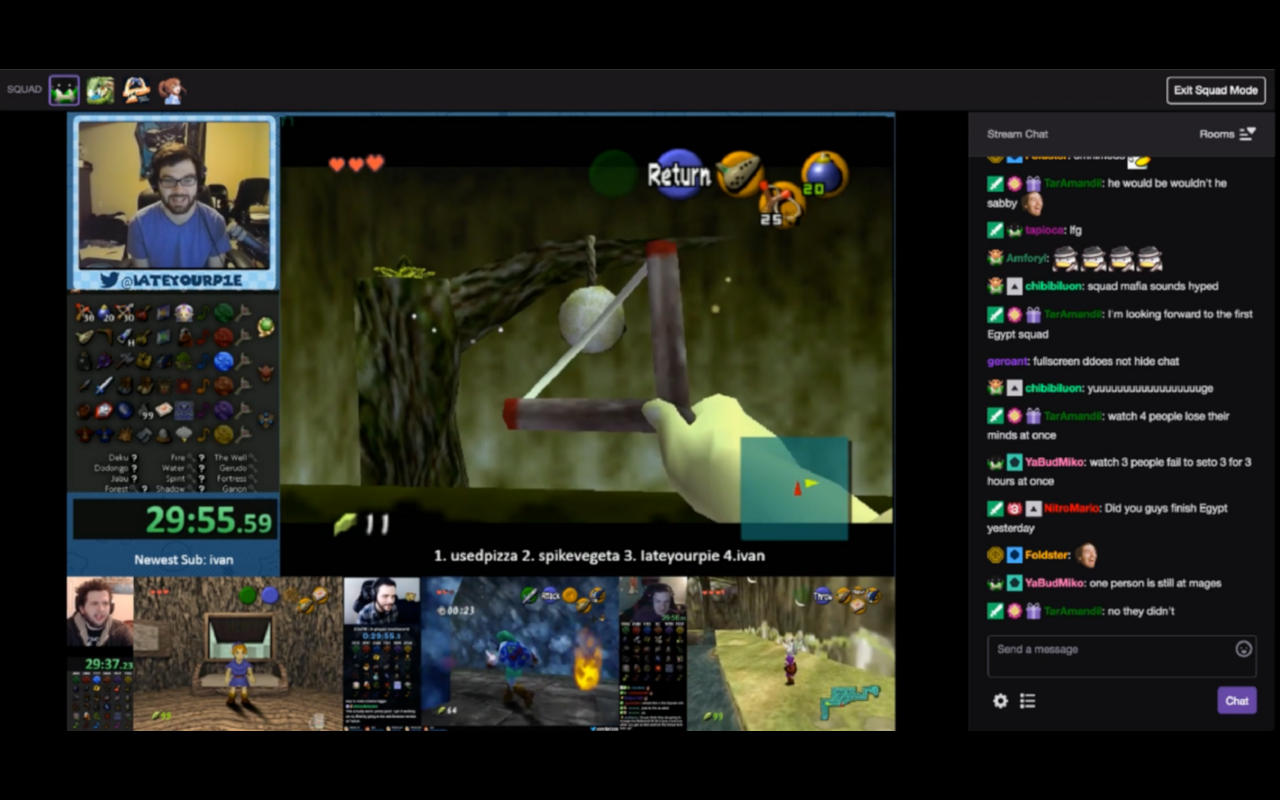
First of all, set up your PC or mobile for Twitch streaming. Don’t forget to add other Twitch users as friends before starting a Squad Stream with them. To do this, either follow them or be a part of a Twitch team with them.

Make sure that you have a Twitch Partner account. As of now, you can only stream with friends if you have a Twitch Partner status. Twitch has assured to offer this new feature for all its users shortly but, we don’t know when.

How to access Twitch Stream Manager?

To start streaming with your friends, you need to first sign in to your Twitch account on the Twitch website. Once you sign in, click on the account icon in the top-right corner. Select the Creator Dashboard option > Stream Manager, to view your stream information. Check if this is available on your Quick Actions menu. If not, add it to your quick access using the add button on the panel.

How to invite your friends to a Squad Stream on Twitch?

Once the Squad Stream option is visible on your quick options panel, click it to start a new stream with your squad. Click the My Stream tab to start your own stream and click the Invites tab to join a stream started by your friend.

Once you click My Stream to start your group stream, use the Add a Channel option and invite the friends using their Twitch username from the drop-down menu. Once your squad is ready, click the Start Squad Stream button and get started.

Other Twitch users can now view your combined stream. They also have the option to click on each streamer’s channel and view it individually.


Tags: Squad StreamStreaming on TwitchTwitch
ShareTweetShareSend

Recent Articles

CRED Founder Kunal Shah to lead WhatsApp Globally as Meta Invests $900 Million in Indian Fintech

CRED Founder Kunal Shah to lead WhatsApp Globally as Meta Invests $900 Million in Indian Fintech

June 22, 2026
India Ranks 28th in Global Favorability Survey as Switzerland and Canada Lead World’s Most-Liked Countries

India Ranks 28th in Global Favorability Survey as Switzerland and Canada Lead World’s Most-Liked Countries

June 22, 2026
ICC Launches Post-Pregnancy Return-to-Play Guidelines for Female Cricketers

ICC Launches Post-Pregnancy Return-to-Play Guidelines for Female Cricketers

June 22, 2026
Picasso Painting Found During Drug Raid in Paris Suburb, Prosecutors Launch New Investigation

Picasso Painting Found During Drug Raid in Paris Suburb, Prosecutors Launch New Investigation

June 22, 2026
BreezyScroll Logo

BreezyScroll is a global content platform that provides a unique experience of enhancing the knowledge quotient for its audience by providing the latest news and updates from various categories such as politics, sports, entertainment, technology, and more.
The platform aims to provide a concise and easy-to-read format for its users. BreezyScroll covers news stories from around the world, majorly the United States. The platform was launched in 2021 and has become one of the fastest-growing content companies in the US.

Follow Us

Browse by Category

  • Africa
  • Alaska
  • Animals
  • Asia
  • Athletics
  • Australia
  • Auto
  • Basketball
  • Bollywood
  • Brand
  • Breezy Explainer
  • Breezy Feature
  • Breezy Soul
  • Business
  • Canada
  • Chess
  • China
  • Coronavirus
  • Cricket
  • DIY
  • Education
  • Entertainment
  • Environment
  • EPL
  • Europe
  • Exclusive Interview
  • Exclusive Review
  • Football
  • Gaming
  • Health
  • Hollywood
  • India
  • International
  • K Pop
  • Law
  • Lifestyle
  • Middle East
  • Money
  • NFL
  • North America
  • OTT
  • Paris Olympics
  • Pets
  • Press Releases
  • Russia
  • Science
  • South America
  • Space
  • Sports
  • Startup
  • Technology
  • Tennis
  • Tennis
  • The Achievers
  • The US
  • Travel
  • UK
  • UK
  • Uncategorized
  • World
  • WWE

Trending Topics

AI Apple Australia Biden California Canada ChatGPT China Climate Change Coronavirus COVID-19 Donald Trump Elon Musk Featured Florida Google IPL Iran Japan Joe Biden Mars Meta Moon NASA NBA Netflix New York North Korea Ohio OpenAI Putin Russia Russia-Ukraine crisis South Korea Taliban Tesla Texas TikTok Trump Twitter UFO UK Ukraine USA Virat Kohli

No Result
View All Result
  • About BreezyScroll
  • Privacy & Policy
  • Contact Us

© 2024 · BreezyScroll.com

No Result
View All Result
  • Home
  • Breezy Stories
  • Technology
  • Gaming
  • Entertainment
  • Lifestyle
  • World
  • Money
  • Sports
  • Breezy Explainer

© 2024 · BreezyScroll.com

Go to mobile version