

• Independence Day
  • About BreezyScroll
  • Privacy & Policy
  • Contact Us
Friday, October 16, 2026
BreezyScroll
  • Home
  • Breezy Stories
  • Technology
  • Gaming
  • Entertainment
  • Lifestyle
  • World
  • Money
  • Sports
  • Breezy Explainer
  • Rakshabandhan
No Result
View All Result
  • Home
  • Breezy Stories
  • Technology
  • Gaming
  • Entertainment
  • Lifestyle
  • World
  • Money
  • Sports
  • Breezy Explainer
  • Rakshabandhan
No Result
View All Result
BreezyScroll
No Result
View All Result

Home  /  Gaming  /  How to use the Squad Stream feature on Twitch: A stepwise guide

How to use the Squad Stream feature on Twitch: A stepwise guide

by KS Arpitha
May 21, 2021
in Gaming
Reading Time: 3 mins read

Twitch is no longer a solo-streaming platform. You can now stream with your friends using Switch’s latest feature-Squad Stream. It allows up to four streamers to combine their streams in one window for their viewers. Here is everything you need to know to get started.

Getting started for Squad Stream on Twitch
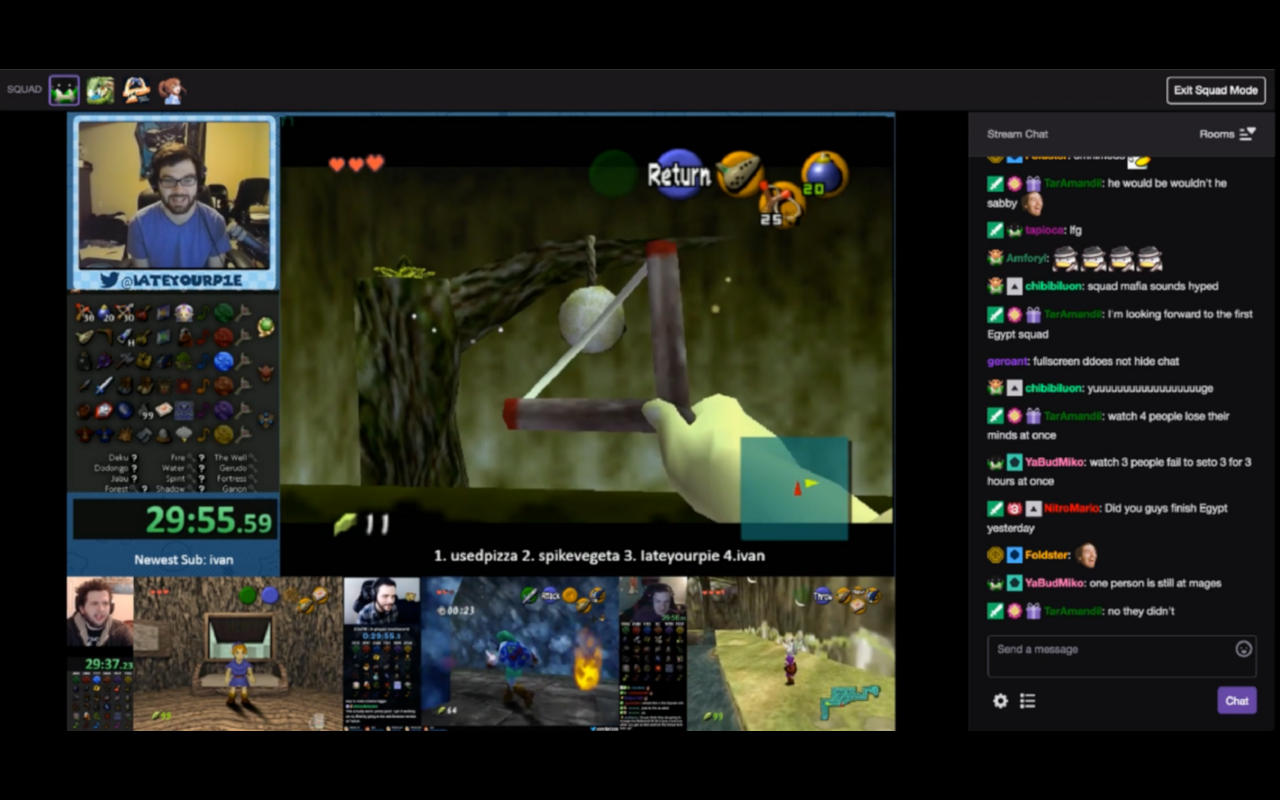
First of all, set up your PC or mobile for Twitch streaming. Don’t forget to add other Twitch users as friends before starting a Squad Stream with them. To do this, either follow them or be a part of a Twitch team with them.

Make sure that you have a Twitch Partner account. As of now, you can only stream with friends if you have a Twitch Partner status. Twitch has assured to offer this new feature for all its users shortly but, we don’t know when.

How to access Twitch Stream Manager?

To start streaming with your friends, you need to first sign in to your Twitch account on the Twitch website. Once you sign in, click on the account icon in the top-right corner. Select the Creator Dashboard option > Stream Manager, to view your stream information. Check if this is available on your Quick Actions menu. If not, add it to your quick access using the add button on the panel.

How to invite your friends to a Squad Stream on Twitch?

Once the Squad Stream option is visible on your quick options panel, click it to start a new stream with your squad. Click the My Stream tab to start your own stream and click the Invites tab to join a stream started by your friend.

Once you click My Stream to start your group stream, use the Add a Channel option and invite the friends using their Twitch username from the drop-down menu. Once your squad is ready, click the Start Squad Stream button and get started.

Other Twitch users can now view your combined stream. They also have the option to click on each streamer’s channel and view it individually.


Tags: Squad StreamStreaming on TwitchTwitch
ShareTweetShareSend

Recent Articles

Tesla Roadster 2 Unveiled: Watch Elon Musk’s Flying Supercar, Price, Specs, and 2028 Release Date

Tesla Roadster 2 Unveiled: Watch Elon Musk’s Flying Supercar, Price, Specs, and 2028 Release Date

October 16, 2026
Leap Second To End in 2027: What The Global Timekeeping Change Means

Leap Second To End in 2027: What The Global Timekeeping Change Means

October 15, 2026
Trump Cancels Nidal Hasan Execution Livestream After Backlash

Trump Cancels Nidal Hasan Execution Livestream After Backlash

October 15, 2026
Who Is Katie Zacharia? Trump’s New Press Secretary Faces Questions Over Legal Credentials

Who Is Katie Zacharia? Trump’s New Press Secretary Faces Questions Over Legal Credentials

October 15, 2026
BreezyScroll Logo

BreezyScroll is a global content platform that provides a unique experience of enhancing the knowledge quotient for its audience by providing the latest news and updates from various categories such as politics, sports, entertainment, technology, and more.
The platform aims to provide a concise and easy-to-read format for its users. BreezyScroll covers news stories from around the world, majorly the United States. The platform was launched in 2021 and has become one of the fastest-growing content companies in the US.

Follow Us

Browse by Category

  • Africa
  • Alaska
  • Animals
  • Asia
  • Athletics
  • Australia
  • Auto
  • Basketball
  • Bollywood
  • Brand
  • Breezy Explainer
  • Breezy Feature
  • Breezy Soul
  • Business
  • Canada
  • Chess
  • China
  • Cricket
  • DIY
  • Education
  • Entertainment
  • Environment
  • EPL
  • Europe
  • Exclusive Interview
  • Exclusive Review
  • Football
  • Gaming
  • Health
  • Hollywood
  • India
  • International
  • K Pop
  • Law
  • Lifestyle
  • Middle East
  • Money
  • NFL
  • North America
  • OTT
  • Paris Olympics
  • Pets
  • Russia
  • Science
  • South America
  • Space
  • Sports
  • Startup
  • Technology
  • Tennis
  • Tennis
  • The Achievers
  • The US
  • Travel
  • UK
  • UK
  • Uncategorized
  • World
  • WWE

Trending Topics

Afghanistan AI Apple Australia Biden California Canada ChatGPT China Climate Change Donald Trump Elon Musk Featured Florida Google IPL Iran Japan Jeff Bezos Joe Biden Mars Meta Moon NASA NBA Netflix New York North Korea Ohio OpenAI Putin Russia Russia-Ukraine crisis South Korea SpaceX Taliban Tesla Texas TikTok Trump Twitter UFO UK Ukraine Virat Kohli

No Result
View All Result
  • About BreezyScroll
  • Breezy Stories
  • Contact Us
  • Privacy Policy
  • We Believe in You: Showcase Your Potential to the World
  • World News – Latest News Today | BreezyScroll

© 2024 · BreezyScroll.com

No Result
View All Result
  • Home
  • Breezy Stories
  • Technology
  • Gaming
  • Entertainment
  • Lifestyle
  • World
  • Money
  • Sports
  • Breezy Explainer
  • Rakshabandhan

© 2024 · BreezyScroll.com

Go to mobile version